Applies to user roles: Account Owner, Manager
Available on platforms: Vatix Workspace web app
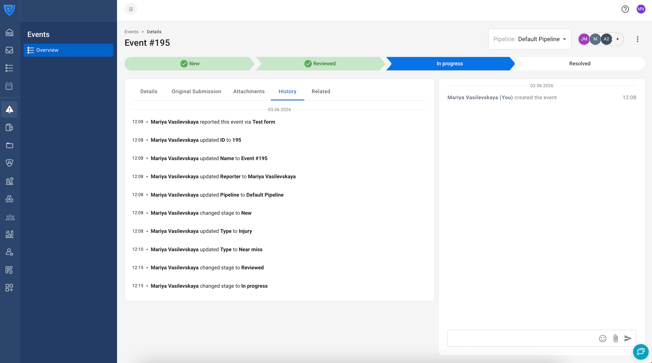
The History tab records changes made to an Event record. Each entry shows who made the change, what was changed, and when the change happened.
This is separate from the Activity Feed, which captures comments and collaborative discussion posted by users. The History tab is read-only.
How to access the History tab
- Go to 'Events' in the left sidebar.
- Open the Event record.
- Select the 'History' tab in the tab row (it is displayed alongside 'Details', 'Original Submission', 'Attachments', and 'Related').
What the History tab records
Here are examples of changes recorded in the History tab:
- When the Event was reported and by whom
- Event field value changes
- Pipeline changes
- Stage changes