
Note: The Protector Mobile app was renamed to the Vatix app on 5 October 2026. Read more about the rename.
If you are in an emergency or feel unsafe, you can raise an alarm from either the Lone Worker app or a Safe Pro device. In both cases, the alarm will be sent immediately to the ARC or your organisation's emergency contacts, along with your GPS location.
How to raise an alarm in the Lone Worker app
- Open the Vatix app (formerly Protector Mobile app).
- Go to 'Safety'.
- Press and hold the 'Alert' button for 3 seconds.
The alarm is sent straight away. A call is then placed to the Alarm Receiving Centre or to the escalation contacts set in your Alarm Response Profile, depending on whether you use Vatix 24/7 Monitoring or Self-Monitoring.
On an Android phone
The call is placed for you, so there is nothing else to tap.
Before the app can do this it needs your permission, and it asks for it once, the first time you open 'Safety' after updating. An 'Emergency call access' message explains that the app can call your emergency number for you, so you do not have to tap to dial. Tap 'Continue', then tap 'Allow' on the Android request that follows.
If you tap 'Not now', or 'Don't allow' on the Android request, nothing is lost. The dialler opens with the number already filled in for you to tap, exactly as it did before, and the alarm is still raised and sent to your responders.
On an iPhone
Your phone prompts you to place the call. Tap 'Call' to start it.
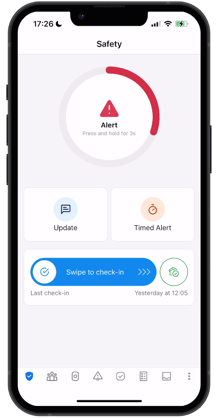
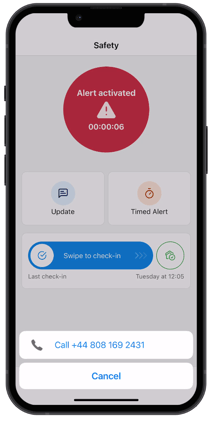
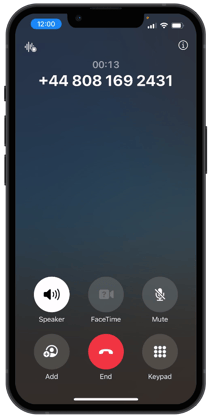
Note: The alarm will remain active whether or not you place the call.
Once the call is answered, speak to the responder and explain the situation.
Note: If you are using Vatix 24/7 Monitoring, the ARC will listen and assess the situation before speaking to you.
The 'Alert' button will remain active until the alarm has been closed by the responder who accepted it. If the alarm was raised accidentally or during testing, you should still complete the call so that the responder can check that you are safe and close the alarm.
How to raise an alarm on a Safe Pro device
Press and hold the SOS button on the Safe Pro device for 3 seconds until the device vibrates.
The alarm will be sent immediately to the ARC or your organisation's emergency contacts, along with your GPS location. You do not need to speak or press anything else.
Stay where you are if it is safe to do so. An ARC operator or emergency contact will call you through the device's built-in speaker. Speak directly into the device.
Note: If you are using Vatix 24/7 Monitoring, the ARC will listen and assess the situation before speaking to you.
To raise an alarm discreetly, press and hold the SOS button from inside a pocket or bag. The alarm will still trigger even if the button is partially obscured.
Note: To learn more about what happens after an alarm is raised, read this article.