
Applies to user roles: Account Owner, Manager, User
Available on platforms: Vatix Workspace web app
When a control is 'Proposed', its owner gets a control action to put it in place by the due date. Once you submit your evidence, the control is 'In place' on every Risk it's on.
When you get a control action
Vatix creates a control action when a control's status is 'Proposed'. It's assigned to the control's owner and is due on the control's due date. You get the 'Risk action assigned to me' notification. See 'How to manage your notification preferences'.
How to find your control actions
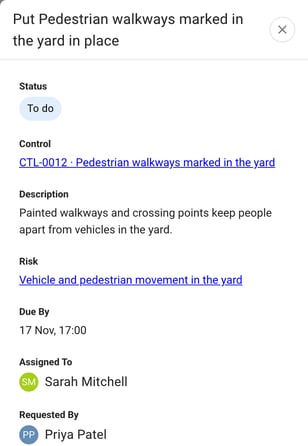
Go to 'Actions' > 'Risks'. Each control action is named "Put [control name] in place", with the 'Type' 'Control action' and the 'Status' 'To do'.
Click an action to open it. It shows the 'Status', the 'Control', a 'Description', the 'Risk' or Risks the control is on, 'Due By', 'Assigned To' and 'Requested By'. Click the control or a Risk to open it.
How to submit evidence
- Go to 'Actions' > 'Risks' and open the control action.
-
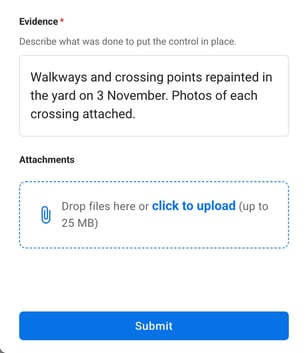
Under 'Evidence', describe what was done to put the control in place.
-
If you have files to back it up, add them under 'Attachments'. You can add up to 10 files.
- Click 'Submit'.
The evidence can be up to 10,000 characters. 'Submit' becomes available once you've typed some evidence.
You can submit evidence on a control action assigned to you while its status is 'To do'.
What happens after you submit
The control action is marked done, and the control is 'In place' on every Risk it's on. The action then shows who submitted it and when, with the evidence and any attachments.
What happens if the control changes
The control action follows the control in the 'Controls library':
- If the control's owner changes, the action moves to the new owner, who is notified.
- If the due date changes, the action's due date moves with it.
- If the control is set to 'In place', the action is marked done.
- If the control is archived, the action is cancelled.
See 'How to manage the Controls library'.
Related articles